Stator Portfolio Management Software  
Innovative Portfolio Management Software
for Successful Traders, Investors
Business & Educators


Charting Analysis and Stock Analysis Software


TOPIC CONTENTS

1. Introduction to charting analysis and price charts.
2. Technical vs fundamental analysis.
3. Types of charts.
4. What are indicators?
5. Getting starting with charting & technical analysis.
6. A brief discussion about stock analysis software.
7. Stock analysis software recommendations.

Charting analysis uses a graphical representation of a securities price to provide a basis for further analysis. This topic will concentrate on the primary elements of charting analysis and briefly discuss the advantages of stock analysis software to perform this type of analysis.

The basis for charting is to provide a plot of the securities price. The term security can be interchanged for any instrument, i.e. shares, warrants, futures etc. We are all used to picking up the paper or watching the nightly news and getting an update of the latest prices. The price that is commonly quoted is the closing price. This is the last price the security traded at before the end of the specified period.

A period can be any determined time period, common periods include daily, weekly and monthly. When a security price is plotted using a weekly period the closing price is the price of the security at the end of the week. With this concept in mind we can easily add three other elements to the price for any specified period. We can define the open, high and low in addition to the close.

These four price points (open, high, low, close) are the basis for all charting analysis and are used extensively by all stock analysis software.


    Technical Vs Fundamental Analysis  


What motivates you to predict a securities future price?

Many investors find themselves using various means to try and predict the future price of a security. Performing this analysis assists the investor to make a purchasing decision.

There is two generally accepted methods employed by investors when trying to determine the future price direction of securities, technical and fundamental. You will always come across the debate of technical versus fundamental. You may find yourself more comfortable in one particular field or you may appreciate the different aspects of both approaches. Use the guide below to determine what type of analyst approach you are most comfortable with.

     
    Technical Analysis  


Technical analysis uses only the plotted price action to determine to the future price direction of the security. Technical analysis employs the use of charts and indicators as well as the recognition of patterns in price charts to determine the future direction of prices.

Technical analysis is an art form that is very widespread. An investor using technical analysis is not concerned with the individual supply and demand characteristics, earning capacity, statement of financial position, cash flow, market segmentation etc of the security. Only the price data is relevant to a technical analyst.

A technical analyst can draw upon the information obtained in the price chart to determine the future direction. A technical analyst is said to be studying the behavior of the market itself, to determine the current market condition and thus future price movements.

     
    Fundamental Analysis  


Fundamental analysis is concerned with the supply and demand, earning capacity, statement of financial position, cash flow, economic condition etc of the company being assessed. This assessment indicates the potential for future price appreciation or depreciation.

A fundamental analyst has a belief that the economic condition of the company is reflected in the price of the security in the market. Studying the underlying fundamentals of the company will provide an understanding as to the future price movements of the security.

A limitation of this approach is the potentially huge information gathering exercise that is required to assess every supply and demand factor which can influence the securities price and having these factors weighted correctly to determine the long term movement in the securities price.

Fundamental analysis takes on a more long term view to price appreciation and depreciation. Due to the intense analysis required, investments based upon purely fundamental approaches are usually medium to long term.


Click here to download PDF article
Stock-Market "Patterns" and Financial Analysis (892KB)  


Author:

Harry V Roberts
Date: 1959
Synopsis:

A paper written in 1959 but still has the same or may be with more relevance now. "the history of market itself contains patterns that give clues to the future, if only these patterns can be properly understood"

Complexity: Advanced

 
    Types of charts  


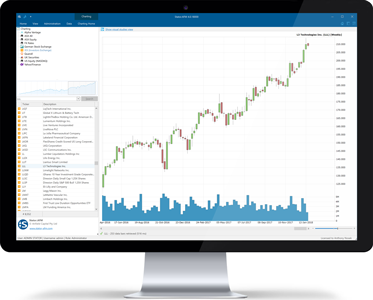
The majority of stock analysis software available on the market today can produce different types of charts, the major types of charts used by analysts are expanded upon below.

In addition to the price plot of a security it is common to plot the volume for the particular period at the bottom of each chart. This is purely optional however many of the stock analysis programs available will load the volume into the price chart by default. It is good practice to include the volume of each period in your charting analysis.

For further instructions on plotting volume please consult your individual stock analysis software.

     
    Line Charts  


The most basic chart type is a single point plot of the securities price. This may either be a plot of the open, high, low or close and produces a simple line chart as shown in the picture below. This is the most basic style of price chart.

Line Chart

The picture shown above is a plot of a securities close price based upon a daily period. A major advantage of the line chart is the simplicity it provides, many analysts agree that a line chart can produce a "clearer" picture of market activity and is an easy way to eliminate some of the "noise" that can occur with other chart types.

     
    Bar Charts  


The bar chart are the most popular method of plotting a security price. A bar chart provides a plot of each price unit (open, high, low and close) for each period. This is four times as much information as a line chart.

Interpreting the bar chart is rather simple, each bar consists of a line and two marks on either side of the line. Have a look at the picture below paying particular attention to the bar on the far right of the chart, this is the last period plotted in this chart.

Bar Chart

We can see that this bar stretches from around $21.28 to $21.53. The line represents the price extremes for the period, i.e. the high and the low. To draw this we would make a point at the high of the period and another point at the bottom of the period. Draw a line between the two and we have our basic bar.

The next step is to add the open and close to the bar. The open is a tick placed on the left hand side of the bar and the close is a tick placed on the right hand side of the bar.

In the chart above the last period shows an open price of $21.28 (the tick on the left of the bar), a high of $21.53 (top of the line), a low of $21.28 (bottom of the line) and a close of $21.45 (tick on the right of the bar).

     
    Candlestick Charts  


Candlestick charts are a plot of the security price using all the four price points (open, high, low and close). Candlestick charts were developed and used by the Japanese since the sixteenth century when they devised a method of technical analysis to analyse the price of corn contracts.

The construction of a candlestick chart is slightly different to a bar chart. The main difference being the colour of the body, if the close is below the open the body of the bar is filled in with colour. Alternatively if the close is above the open the body of the bar is not filled in with colour.

CandleStick Chart

As shown in the picture above the last period plotted has a higher closing price than an opening price, this results in the body of the bar not being filled in with colour. Stock analysis software have incorporated the candlestick chart since they increased in popularity in the early 1990's. Many analysts claim the candlestick chart as a "long forgotten Asian secret".

The many pattern names have vary interesting mystical name such as hammers, hanging man, doji, gravestone, dark cloud to name a few. The intriguing names of these patterns also support their mystique.

An Introduction to Japanese Candlestick Charting - by Erik Gebhard


Click here to download PDF article
Candlesticks For Support & Resistance (135KB)  


Author:

John H Forman III
Date: Unknown
Synopsis:

Learn how to use Candlestick charts to identify support and resistance in price charts.

Complexity: Beginner


    Point & Figure Charting  


Point and Figure charting is distinctly different to the other charting types we have discussed by the fact that only price action is displayed and all reference to time is disregarded. The price data is represented by a series of X's and O's that indicate only when the price rises or falls by more than the "box" amount.

Each column can contain either X's or O's, a single column can never contain both. Traditionally an X is used to indicate a rising price and an O is used to indicate a falling price. Before a new column can be made the price must move by the reversal amount multiplied by the box size.

Point and Figure Chart

In the picture above we have used a box size of 10c and a reversal of 3. We are currently in an X column (column on the far right). To start a new column of O's the price will have to move (reverse) by more then 30c (3 x 10c). When this occurs we plot a new column of O's.

To add a new O or X to an existing column the price needs to move by the box amount, i.e. in the current column of X's we will plot a new X when the price rises by another 10c (box amount).

You can set box sizes and reversal parameters to any number you wish. Each time you will create a uniquely different chart. You should also choose the same price variable to plot the chart. In this example we have used the closing price, it would create a different chart altogether had we chosen to plot the chart using the open or high price. Remember to be consistent with your variables.


    What are indicators?  


While the basis for all charting consists of plotting price data many analysts use indicators to assist their analysis. An indicator is an additional plot of data with the data being generated from a mathematical formula consisting of price data.

You can create many indicators for a vast array of purposes. You will find that many stock analysis software applications come per-programmed with various indicators to save you time having to calculate them manually.

An indicator creates another plot on which is viewed in conjunction with the price plot of the security. The picture shown below is a bar chart with a moving average indicator plotted along side the bar chart.

Indicator Example

Two broad categories of indicators exist, lagging (trend following) and leading. These are discussed further below.

     
    Lagging Indicators (Trend Following Indicators)  


Trend following indicators are designed to provide a guide to the general trend of the market. As a result they are best designed to work in a market which displays a tendency to trend either up or down.

The following indicators are trend following indicators:

tick symbol Bollinger Bands
tick symbol Moving Averages
tick symbol Moving Average Convergence/Divergence (MACD)

tick symbol Demand Index
tick symbol Parabolic Indicator

There are many more trend following indicators however the indicators mentioned above are amongst the most common.

Due to their lagging nature these indicators generally move after the price action has taken place, they are used to confirm market moves as opposed to predicting them.

     
    Leading Indicators  


The other category of indicators is the leading indicator. Leading indicators are best used in markets which are reaching the end of a trend or are in a sideways momentum with little trend displayed.

A leading indicator will attempt to identify a significant turning point in the market, hence their name leading. Many analysts use leading indicators to attempt to predict a change in the market/security direction and take action accordingly. As a result these types of indicators are generally used to indicate the overbought/oversold status of a security/market and the degree to which it is overbought/oversold.

The following indicators are leading indicators:

tick symbol Relative Strength Indicator (RSI)
tick symbol Stochastic Oscillator
tick symbol Rate of change indicators

tick symbol Moving Average Oscillators

The inclusion of these popular leading indicators in stock analysis software is widespread. The most popular of the leading indicators is the Relative Strength Indicator (RSI) and the Stochastic Oscillator.


    Getting started with charting & technical analysis  


Getting started with charting and technical analysis requires two compulsory items:

1. Stock analysis software
We provide further discussion on stock analysis software further into this topic. This is an important step and will be governed by your budget and skill level. One important point is to choose a program that you will not out grow. Any stock analysis software application that you choose should have enough features and flexibility to ensure that you have a limitless number of charting and analysis options.

[Read our discussion on Stock Analysis Software]

2. Data
Any form of charting requires data.The data contains all the information for each specific security that you wish to analyse. During the initial stages of setting up your charting environment you will have stock analysis software without any data.

Before you purchase data you need to identify which market/s you are going to follow. Let's assume that you are going to chart the entire US market. The next step after identifying the market to follow is to purchase historical data to load into your charting software.

Historical Data
Historical data is all the data for your selected market for a historical time frame. Historical data will enable your charting software to build a chart for any security in your selected market starting from a historical date in the past.

The length of your historical data will vary depending upon the vendor you purchase the data from. We recommend a time frame of between 5 to 10 years for your historical data to begin with. Of course, the longer the duration of your historical data the better, it means that you will be able to analyse more for each security.

Some points to consider when purchasing historical data:

tick symbol The longer the duration of the historical data the better.At a minimum your historical data should go back at least 5 years (for those securities 5 years and older).

tick symbol Make sure the format of the historical data will load seamlessly into your software. It can be frustrating if you have spent your money only to find the format of the data will not load into your stock analysis software.

tick symbol Only purchase reputable historical data. Your data is the most important part of your analysis toolbox. Make sure your data is correct and has been adjusted correctly for all share splits, mergers etc.

tick symbol Gather recommendations from other users of the same stock analysis software which is the best vendor of historical data.

End of Day (EOD) data
After you have installed historical data into your stock analysis software you need to update your database with current data on a periodic basis. Depending upon the timeframe of your data, you will be either importing data at the end of each trading period or constantly during the trading period (Real time).

For the purposes of this discussion we only concentrate upon EOD data.

Your stock analysis software should have a facility to manually import EOD data or have it automatically updated. You will usually find the automatic method is performed through another data supply vendor. For more information regarding this it is advisable to contact the vendor from which you purchased your historical data.

Manually updating your database with EOD data is without doubt the most popular method of maintaining a database of securities. It is the cheapest method and only requires a small amount of time invested.

Traditionally EOD data is provided in the form of a text file. The text file contains information for all securities in a particular market detailing the price movements (open, high, low, close and volume) for the trading period. These text files are made available to users from data vendors or most stockbrokers.

Some points to consider when using EOD data:

tick symbol Choose either the manual method or the automatic update method.

tick symbol Choose a reputable provider of EOD data. Your database should be maintained with a high degree of accuracy. Make sure your EOD data provider is reputable in the industry.

tick symbol Find out when EOD data is made available to you. The sooner after the market closes the better. You can start your analysis earlier and have more time before the market opens for the next trading period.

tick symbol Ensure your stock analysis software is compatible with the EOD data format that you receive.


    Stock Analysis Software  


You will find a vast array of stock analysis programs to choose from. By the term stock analysis software we imply charting software. Stock analysis software can range from freeware utilities to $2000+ programs, it comes down to your individual budget and requirements.

We do tend to find that many investors start with a simpler charting package while they get used to charting and technical analysis. You will find that as your experience grows you will desire stock analysis software with more features and flexibility to enable you to expand your technical analysis capabilities.

The following is a brief guide to some areas to consider when selecting stock analysis software.

tick symbol Does it support a wide range of chart types?

We described three of the most popular chart types above. As a minimum you should ensure that the charting package can support a simple line chart and bar chart (open, high, low, close). Stock analysis software aimed at the more professional end of the market come with an almost limitless array of chart types and some are even sophisticated enough to allow you to create your own chart types.

tick symbol What kind of database does it use?

All stock analysis software stores price information for each security for each period. Think of this as a large database filled with price information. It is wise to understand what kind of database technology the stock analysis software uses, it is common for many of the smaller programs to utilise a proprietary database that has been designed by the makers of the program.

This has several limitations, firstly the database becomes a "one-of-a-kind". You need to be confident that the company making the stock analysis software is going to be around to support the database. We have seen various charting software applications brought to the market only to be bought out or stop leaving all the users with a database of data that is not supported.

Increasingly we are seeing the major stock analysis software applications utilise a common database. This seems to be an emerging trend as the leaders in this industry take more of a market share.

Be wary of the database requirements of any stock analysis software before you decide upon which one you are going to use.

tick symbol Is historical data readily available for the database format?

This leads on from the previous question. After you purchase any stock analysis software you are going to need historical data. Historical data is price data that can be loaded into the stock analysis software enabling you to view charts with pre-loaded data. You then continue to update the data on a periodic basis to keep the database up to date.

Make sure that you can readily purchase or obtain historical data for the securities you wish to analyse and in the format which the stock analysis software requires.

tick symbol How can the price data get updated?

Another data management question! Don't forget all stock analysis software are giant stores of price data. You need to make sure the data management side of the software application is going to meet your requirements.

After you have installed historical data the only maintenance item required will be to update the price data on a periodic basis, this may be every hour, every day, week or month. It depends upon the data you are using for your analysis.

The most commonly accepted way of updating price information is to import a text file of price information straight into the database. The text file of data can be obtained from either a data provider or more common these days is for the data to be provided by a stock broker.

Other methods of updating prices may include an automatic update over the internet. This is convenient as it is "click of a button" updating. If you think you would prefer this method of price updating then you will have to make sure the stock analysis software supports this feature as well as your data provider.

Most stock analysis software programs will support the updating of price data manually. This is not an option when you are analysing more than 30 securities as it becomes too time consuming to update each price manually.

tick symbol All in one analysis packages?

We generally do not recommend the "all-in-one" approach to stock analysis and portfolio management. You will come across stock analysis software applications which combine charting, portfolio management, personal management and more. These types of applications are generally lacking in quality and features which you will need to perform each part of the job correctly.

We recommend a portfolio management application designed to do only one specific task, portfolio management. Stator - Advanced Finance Management is a perfect example of a solid portfolio management solution which you will not grow out of.

The same can be said for stock analysis software, you should aim to purchase an application that has been designed for the job and has a strong reputation for providing a solid charting platform for all skill ranges.

tick symbol Does the software have its own programming language?

If you feel technically minded you will get to the stage were you will want to create your own indicators and systems to expand your analysis. If you think you are going to want this flexibility you will need to ensure that the stock analysis software that you settle on has a programming language that is widely used and accepted, has a large user base (for support and help purposes) and is flexible enough to cater for your needs.


    Stock Analysis Software Recommendations  


Investors and traders of all levels can appreciate the vast array of charting software which is available in the marketplace. The increased choice can make the discussion a bit more difficult. We have taken the time to compile a short list of recommended charting software which is powerful enough to cater for your ever growing requirements.

OmniTrader
[Click here to learn more about OmniTrader]

MetaStock®
MetaStock has been the standard in stock analysis software for many years due to its affordable platform, advanced features and large user base. With any stock analysis software that you settle upon, it is always helpful to know how many other people use the software. This provides a free resource for tips, tricks and general help using the application.

MetaStock provides flexibility to program custom indicators, explorations, expert advisors and more using it's very own custom formula language. MetaStock is stock analysis software that you will not out grow.

For more information relating to MetaStock check out the following internet resources.


    Equis (Website)  


Visit the makers of MetaStock. Review the features of the latest version of this affordable stock analysis software.


Back to the top    
Anfield Capital © 2004-2010